Majmar
Кальянная на Дубай-Крик
Открыть сайт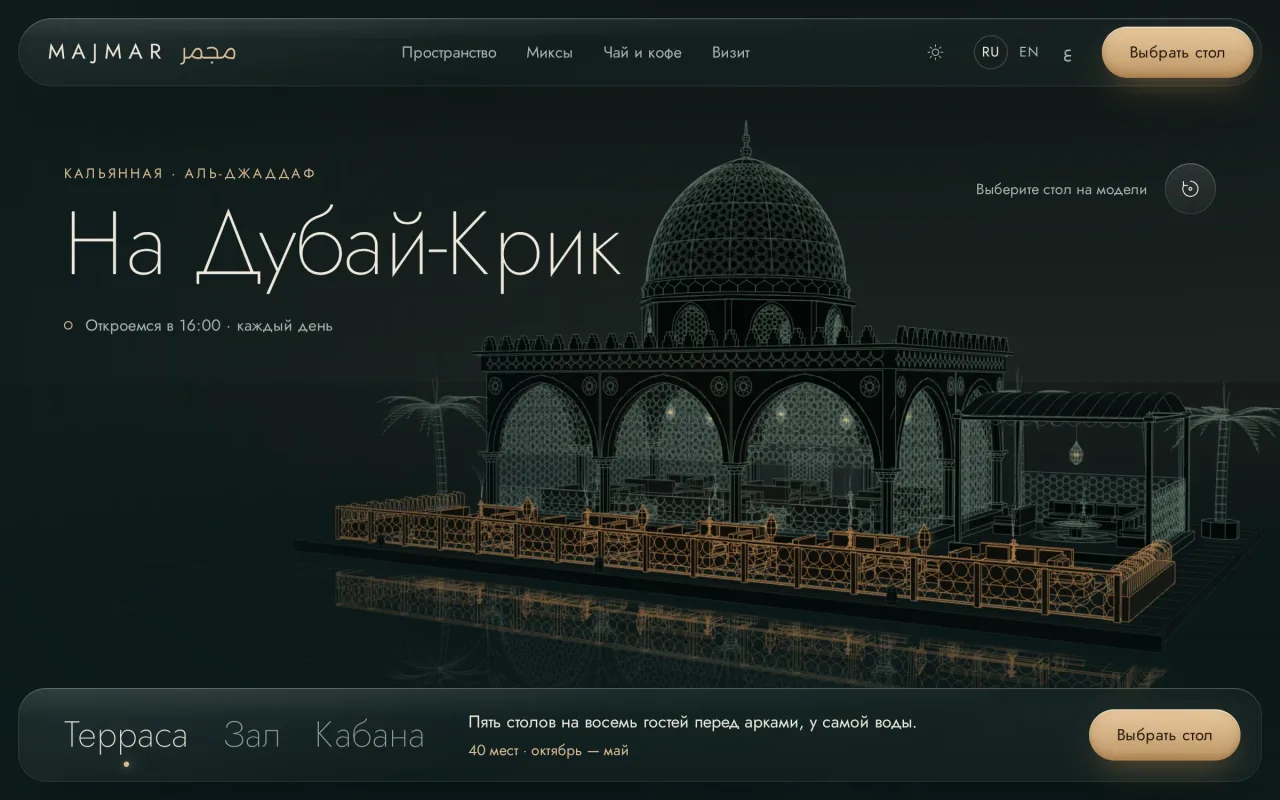
Концепция
Стол выбирают прямо на чертеже заведения.
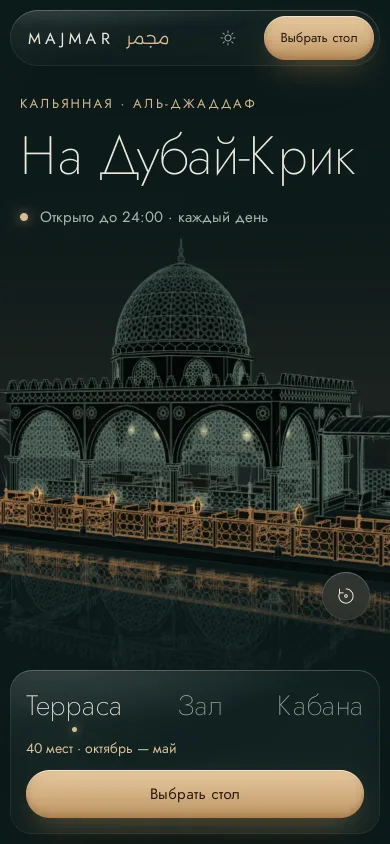
Majmar показывает кальянную в виде объёмного архитектурного чертежа: гость поворачивает павильон, открывает нужную зону и выбирает конкретный стол для запроса на бронь.
Задача
По меню и форме бронирования не понять, где будешь сидеть и какие правила действуют для компании. Гостю нужно увидеть пространство, выбрать место и узнать условия до того, как связаться с заведением.
Разбор экрана
Что видит гость на первом экране и как это устроено.
Павильон
Объёмная модель зала, террасы и кабаны. Геометрию строит код, орнамент рисуется по правилам гирих.
Столы
Каждый стол выбирается прямо на модели: число мест, свободное время на сегодня, подают ли кальян.
Подсказка и сброс
Колесо листает страницу, Ctrl или ⌘ с колесом приближают модель, кнопка возвращает камеру на место.
Три языка
Русский, английский и арабский. Арабская версия читается справа налево в той же вёрстке.
Зоны
Камера перелетает к террасе, залу или кабане; рядом — вместимость и сезон зоны.
Выбрать стол
Открывает бронь: стол, время, гости, микс. Сайт собирает текст запроса и ничего не бронирует.
Сценарий
Путь посетителя по сайту, записанный на живом сайте.
- 01
Осмотреть павильон
Вкладка «Зал» за 1,6 секунды переводит камеру под купол, «Кабана» — к столу под навесом. Линии выбранной зоны загораются золотом, внизу меняются описание и вместимость зоны. Перетаскивание поворачивает модель.
- 02
Выбрать микс
Миксы разделены на светлый лист, тёмный лист и смесь без табака; для табака указаны чаша и жар. Нажатие меняет фото чаши, название и цену под ним, а панель брони внизу экрана запоминает выбранный микс.
- 03
Собрать запрос
Нажатие на стол подводит к нему камеру. В панели брони — день, время на шкале примерных броней (на занятом отрезке оно краснеет), места гостей на схеме стола и имя. Сайт собирает текст запроса с уже выбранным миксом и копирует его по кнопке; стол не бронируется.
Инженерия
- Технологии
- Three.js
- Осмотр павильона
- Посетитель поворачивает павильон и выбирает стол прямо на модели. Сцена написана на JavaScript с Three.js без интерфейсного фреймворка.
- Модель
- Для осмотра павильона не нужно скачивать отдельный файл модели: стены, фонари, стекло и столы строятся кодом по его чертежу.
- Первый кадр
- Экран не пустует, пока грузится 3D: фоновый поток рисует линейный чертёж павильона.
- Дым
- Дым движется поверх павильона отдельным слоем, который рисуется на WebGL2.
- Прокрутка
- Сцена не мешает читать страницу: колесо листает, Ctrl или ⌘ с колесом приближают модель, на телефоне вертикальный свайп прокручивает.
- Языки
- Арабская версия читается справа налево без отдельного макета: отступы и выравнивание следуют направлению текста.
- Бронь
- Гость получает готовый текст запроса на бронь и копирует его по кнопке. Стол не бронируется; показанная занятость рассчитывается из даты и номера стола.
Majmar
A shisha lounge on Dubai Creek
Open the website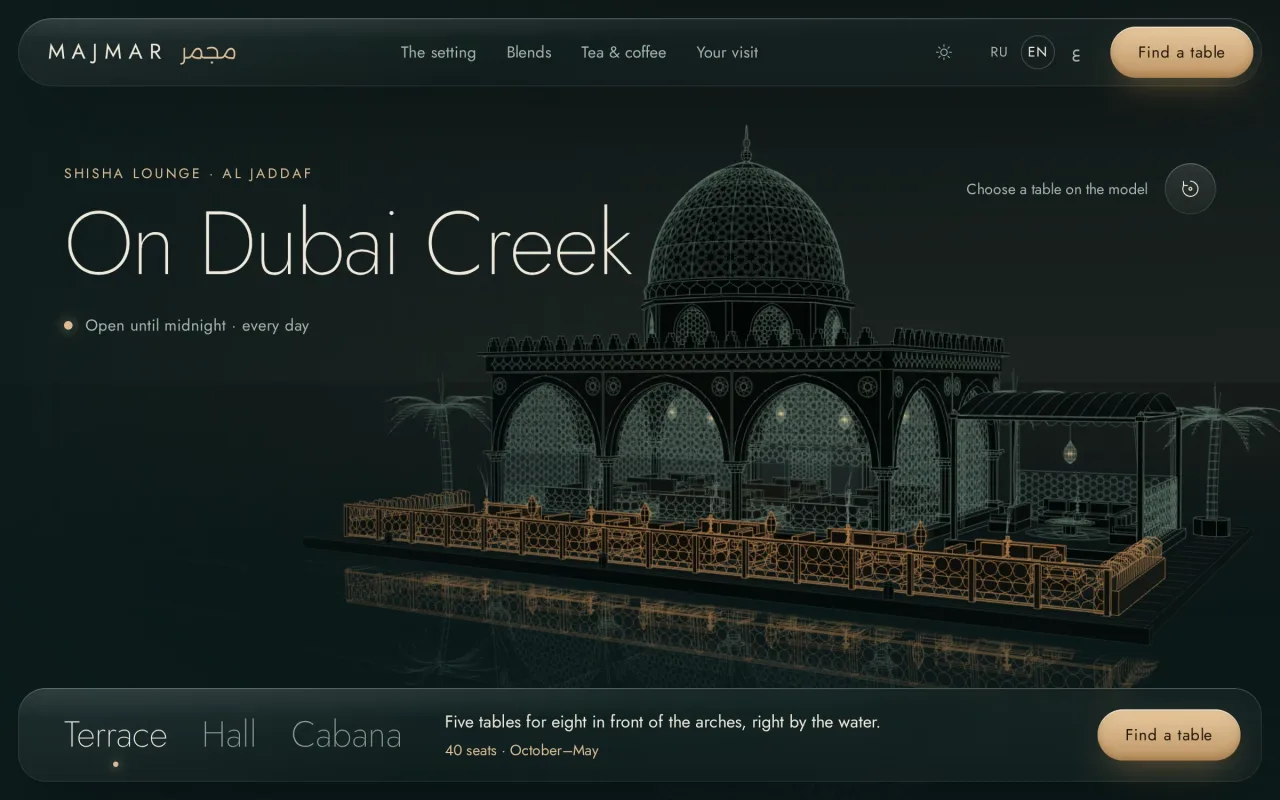
Concept
Choosing a table inside the drawing of the venue.
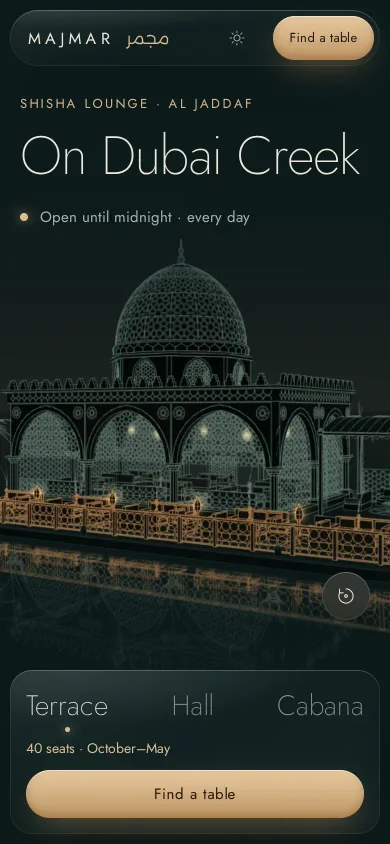
Majmar shows the lounge as a living architectural drawing: the visitor turns the pavilion, opens a zone, and picks the exact table for a booking request.
The task
A menu and a booking form do not show where a guest will sit or what the house rules are for a group. Guests need to see the space, choose a seat, and understand the conditions before contacting the lounge.
Screen anatomy
What a guest sees on the first screen and how it works.
Pavilion
A 3D model of the hall, terrace, and cabana. Code builds the geometry; the ornament follows girih rules.
Tables
Each table is picked on the model: seats, free time today, and whether shisha is served there.
Hint and reset
The wheel scrolls the page, Ctrl or ⌘ with the wheel zooms the model, and the button brings the camera back.
Three languages
Russian, English, and Arabic. The Arabic version reads right to left in the same layout.
Zones
The camera flies to the terrace, hall, or cabana, with the zone's capacity and season beside it.
Choose a table
Opens the booking: table, time, guests, mix. The site composes the request text and reserves nothing.
The flow
The visitor's path, recorded on the live website.
- 01
Explore the pavilion
The Hall tab flies the camera under the dome in 1.6 seconds; Cabana takes it to the table under the canopy. The chosen zone's lines turn gold, and the zone's description and capacity change below. Dragging turns the model.
- 02
Choose a blend
Blends are split into light leaf, dark leaf, and tobacco-free; the tobacco groups name their bowl and heat. A click swaps the bowl photo, name, and price beneath it, and the booking bar at the bottom of the screen keeps the chosen blend.
- 03
Compose a request
Clicking a table brings the camera to it. The booking panel takes a day, a time on the sample-booking scale (it turns red over a taken slot), guests' seats on the table plan, and a name. The site composes the request text with the chosen blend and copies it at a click; no table is reserved.
Engineering
- Technologies
- Three.js
- Exploring the pavilion
- Visitors rotate the pavilion and choose a table directly on the model. The scene uses JavaScript and Three.js without a UI framework.
- Model
- Exploring the pavilion requires no separate model download: code builds the walls, lanterns, glass and tables from its drawing.
- First frame
- The screen is never blank while the 3D loads: a background worker draws the pavilion's line drawing.
- Smoke
- Smoke moves over the pavilion in a separate layer rendered with WebGL2.
- Scrolling
- The scene does not get in the way of reading: the wheel scrolls, Ctrl or ⌘ with the wheel zooms the model, and a vertical swipe scrolls on a phone.
- Languages
- The Arabic version reads right to left without a separate layout: spacing and alignment follow the text direction.
- Booking
- Guests get a prepared booking request and copy it with a button. No table is reserved; the displayed availability is generated from the date and table number.